Apple Watch Water Lock: Why Does the Screen Freeze and How to Clear the Water Drop?
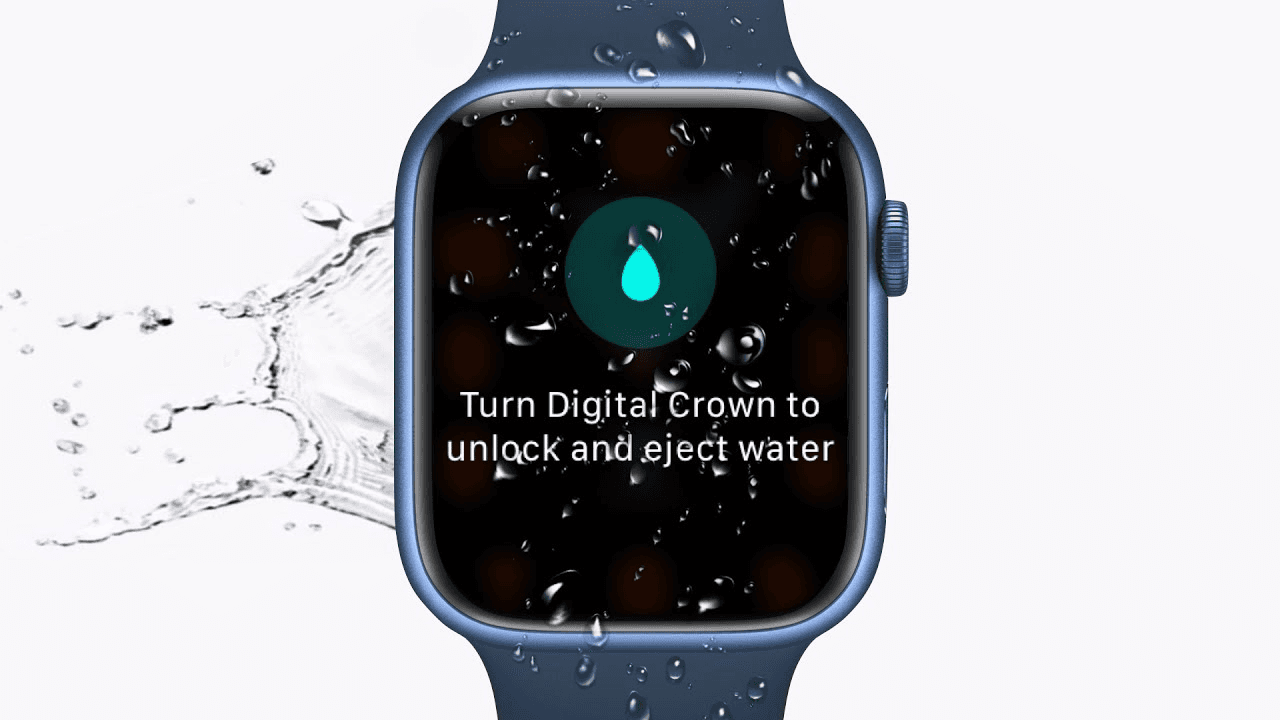
You’re mid-set, gasping for air at the wall, and you glance down to check your 100m split. You tap the screen, but nothing happens. It feels like your Apple Watch Water Lock has frozen your device, leaving you stuck with a glowing blue water drop icon and a non-responsive display.
Don't panic—your watch isn't broken. In fact, it’s doing exactly what I, as a coach, need it to do: preventing the water from "ghost-touching" your workout into oblivion. In this guide, I’ll show you how to master the Water Lock, why your screen "freezes," and the best way to clear that speaker so your Siri doesn't sound like she’s underwater for the rest of the day.
Apple Watch Swimming — What It Actually Tracks
Before we dive into the lock itself, remember that the Apple Watch is a powerhouse for data. Whether you are using the native Workout app or a specialized tool like swimnow.app, the watch utilizes its internal accelerometer and gyroscope to track:
Distance and Lap Counts: Automatically detected via stroke direction and wall push-offs.
Stroke Type: It distinguishes between Freestyle, Breaststroke, Backstroke, and Butterfly.
SWOLF: A calculation of ($seconds + strokes$) per length to measure your efficiency.
Heart Rate: Captured via the optical sensor, though accuracy varies based on how tight the band is while wet.
Real-World Accuracy & Performance
The Apple Watch Water Lock is a software feature, not a mechanical seal. When you start a "Pool Swim" or "Open Water Swim," the watch automatically engages this lock.
Why the Screen "Freezes"
Capacitive touchscreens (like the one on your wrist) work by detecting the electrical conductivity of your finger. Water is also conductive. Without the Water Lock, every splash or submerged moment would be interpreted by the watch as a "tap," potentially pausing your workout or deleting your hard-earned data mid-set.
Accuracy Stats
In my testing, the Apple Watch maintains a 95–98% accuracy rate for lap counting in standard 25m or 50m pools. However, it fails in specific scenarios:
Example 1 (The Social Swimmer): If you stop to talk at the wall but keep moving your arms, the watch might trigger a "phantom lap."
Example 2 (Open Water Drift): In heavy chop, the GPS signal (which only pings when your hand is above water) can "drift," leading to a jagged, inaccurate map of your swim.
Common Problems & Misconceptions
1. "The Water Lock makes my watch waterproof."
False. The Water Lock does not physically seal the watch. It simply disables touch input. Your watch's water resistance is provided by internal gaskets and adhesive, which can degrade over time with exposure to chlorine and salt.
2. "My watch is frozen and won't turn off."
The screen isn't frozen; it's locked. You cannot swipe or tap to get out of this mode. You must use the Digital Crown (and on some models, the side button) to "unlock" the interface.
3. "The Eject sound is damaging the speaker."
That strange, rhythmic "bloop" sound you hear when unlocking is actually a specific low-frequency tone designed to vibrate the speaker diaphragm and physically push water out of the acoustic cavity. It's a feature, not a bug.
How to Improve Tracking Accuracy
If you want elite-level data, you have to help the hardware:
Tighten the Band: A loose band allows water to get between the sensor and your skin, causing "light leakage" that ruins heart rate data. Move it one notch tighter than your "dry" fit.
Firm Push-Offs: The Apple Watch detects a new lap by sensing the change in acceleration and the brief glide. If you "lazy turn" at the wall, it might miss the lap.
Manual Lock for Drills: If you are doing kickboard drills, the watch won't count laps because your arms aren't moving. Use a manual "Lap" button press (both side buttons simultaneously) if your app supports it.
Best Use Cases
Who should use it: Every swimmer from fitness enthusiasts to competitive athletes. It is the gold standard for seamless integration.
Who should NOT use it: Divers going below 40 meters (unless using the Ultra) or high-speed water sports enthusiasts (like jet skiing), where the force of the water can exceed the seal's pressure rating.
Apple Watch Ultra vs. Standard Models
If you’re a serious swimmer, the choice between an Ultra and a Series 9/10 comes down to the environment.
Feature | Standard (Series 9/10) | Apple Watch Ultra 1/2 |
Water Resistance | 50m (WR50) | 100m (WR100) |
Water Lock Ejection | Digital Crown Only | Digital Crown + Action Button |
Screen Size | Large | Massive (Easy to see underwater) |
Battery Life | ~18 hours | ~36-60 hours (Best for 5k+ swims) |
The Verdict: For casual pool laps, the standard model is perfect. For marathon open water swimmers or those who swim 4+ times a week, the Ultra's battery life and dedicated Action Button (to pause workouts with wet fingers) make it the superior tool.
Best Apple Watch Swimming Apps
While the native Workout app is "fine," it lacks the granular coaching many need.
Native App: Best for "set it and forget it" casual swims.
swimnow.app: Ideal for structured workouts, drill tracking, and deeper SWOLF analysis.
MySwimPro: Great for guided training plans.
FAQ
How do I turn off Water Lock on Apple Watch?
Press and hold the Digital Crown on the side of your watch. You will see an animation of a circle filling up. Keep holding until the watch beeps and clears the water. On newer watchOS versions, you may need to rotate the crown rapidly instead of holding it.
Why does my Apple Watch say "Ejecting Water"?
This happens after you turn off Water Lock. The watch uses sound vibrations to force liquid out of the speaker grill, preventing muffled audio and long-term corrosion.
Can I use the touch screen while Water Lock is on?
No. The entire purpose of the Apple Watch Water Lock is to disable the touch screen so that water droplets don't trigger accidental commands.
Does Water Lock protect the watch from salt water?
No, it only manages the screen and speaker. If you swim in the ocean, you must rinse your watch with fresh, non-soapy water afterward to remove salt crystals that can eat away at the seals.
What should I do if the water drop icon won't go away?
If the Digital Crown is stuck or unresponsive, try a "Hard Reset" by holding both the side button and the Digital Crown for 10 seconds until the Apple logo appears. Once it reboots, ensure the Crown is clear of debris.
Is it safe to shower with my Apple Watch?
While the watch is water-resistant, soaps, shampoos, and conditioners can significantly damage the water seals over time. It is recommended to use Water Lock if you do, but better to avoid soaps altogether.
Conclusion
The Apple Watch Water Lock is your best friend in the pool. It’s not a sign that your watch is "frozen," but rather a shield against the chaotic input of splashing water. By understanding how to engage and—more importantly—properly eject water using the Digital Crown, you ensure your device stays accurate and your speaker stays crisp.
Stop fighting the screen and start focusing on your stroke. For the best experience, pair your watch with swimnow.app to turn those raw laps into actionable insights. Now, get back in the lane!