Apple Watch Stops Tracking Swims Mid-Workout? How to Fix It

For the first few weeks, my Apple Watch Ultra was flawlessly tracking my pool swims. But out of nowhere, it developed a maddening habit: it would track the first 200 meters perfectly, and then simply stop recording distance for the rest of the workout.
If your Apple Watch is suddenly dropping laps mid-swim, here is the hidden solution that finally worked for me.
❌ What Didn't Work
Like most people, I tried the usual troubleshooting steps first.
I tightened the waterproof band to the point where it was almost uncomfortable to make sure water wasn't interfering. (Failed)
I went through the tedious 15-minute process of completely unpairing and re-pairing the watch to my iPhone. (Failed)
💡 The Real Culprit: My Stroke Changed
I realized that I had recently been working on improving my swimming technique, making very slight adjustments to my stroke. Because the Apple Watch learns and calibrates to your specific body movements over time, my "new and improved" stroke no longer matched the historical baseline data the watch had saved. It essentially got confused by the new movements and just stopped counting.
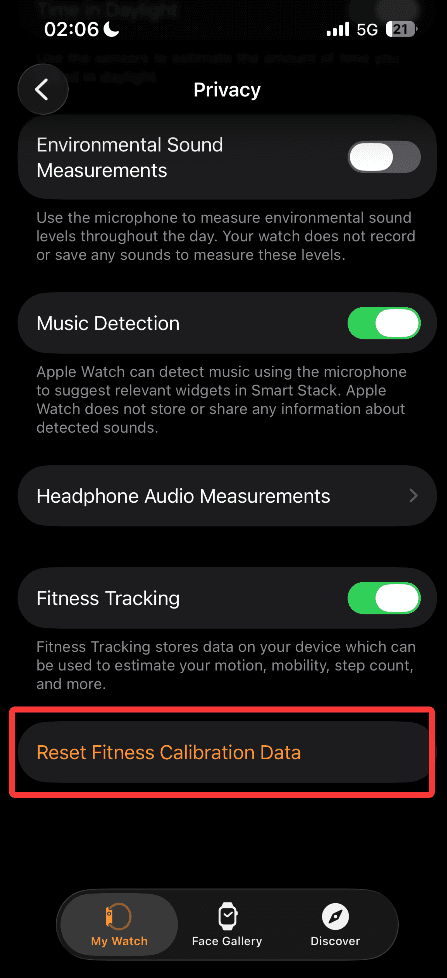
✅ The Ultimate Fix: Reset Fitness Calibration
The solution was incredibly simple, but it is buried deep in the settings menu. You need to clear the old algorithm data so the watch can learn your current swimming style from scratch.
Here is exactly how to do it:
Open the Watch app on your iPhone.
Scroll down and tap on Privacy.
Tap on Reset Fitness Calibration Data.
(Note: Don't worry, tapping this will NOT delete any of your past workouts, rings, or health records—it only clears the motion sensors' historical baseline).
The very next time I got in the pool, my Apple Watch Ultra tracked every single lap flawlessly from start to finish. If you've recently tweaked your swimming form and your distance tracking has gone haywire, do this reset immediately!